
Starter guide
Getting started with Buyer Intent in HubSpot
A practical guide for your marketing team: what it is, how to set it up, and what to watch for before going live.
Chapters
Chapters
Background
What is Buyer Intent and why does it matter?
Most of your website traffic is invisible. Companies land on your pricing page, browse your solution pages, read your case studies and then leave without ever filling in a form. Buyer Intent turns that invisible traffic into actionable pipeline intelligence.
Instead of waiting for someone to raise their hand, Intent lets you see which companies are visiting high-value pages on your website right now and, with Research Intent, which companies and organisations are actively researching topics relevant to your offering, even if they’ve never visited your site.
The result: your team can prioritise outreach based on real in-market behaviour, not just on firmographic fit.
Key distinction
Intent in HubSpot works at the company level, not the individual contact level. Using reverse IP technology, HubSpot identifies which company an anonymous visitor belongs to—not the individual.
What can you actually do with it?
- Prioritise accounts for outreach
- Trigger workflow automation
- Auto-add companies to CRM
- Segment for ABM campaigns
- Alert sales when a key account spikes
- Surface accounts are never in your CRM
- Feed lead scoring models
- Personalise follow-up sequences
Core concepts
Buyer Intent vs Research Intent: What’s the difference?
HubSpot splits intent into two distinct products. They look similar in the UI, but the underlying data source – and privacy implications – are quite different.
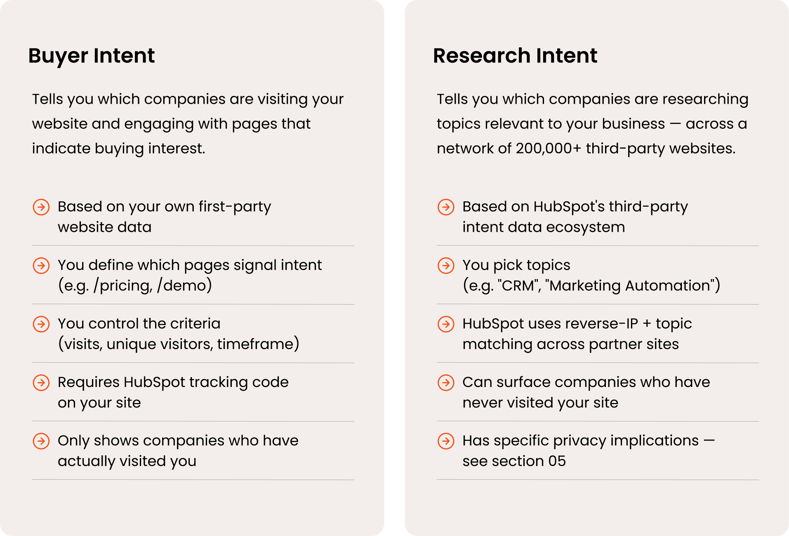
Before you activate Research Intent
Research Intent involves data sharing within HubSpot's ecosystem. When you opt in, you contribute your visitors' browsing data on your site to the network in exchange for access to third-party intent signals. This has GDPR and cookie-consent implications that you need to address first. Please take a look at section 05.
Configuration
How to set up Buyer Intent: step by step
Follow these steps in order. The setup takes 30–90 minutes, depending on how clearly you’ve defined your target markets and high-value pages from the start.
What you need before starting
- HubSpot Starter, Professional, or Enterprise (any Hub)
- HubSpot tracking code installed on your website
- Buyer Intent permission enabled for your user (Settings → Users & Teams → Access → Permissions)
- HubSpot Credits or a seat plan that includes Credits
- A cookie consent banner is in place on your site (required for GDPR compliance)
Credits and seat requirements at a glance

Advanced
Intent signals: monitoring tracked accounts
Beyond the static buyer and research intent views, HubSpot also offers Intent Signals — a real-time monitoring layer for companies you’re actively tracking in your CRM.
Once you mark a company as tracked, HubSpot monitors events such as funding rounds, headcount changes, job postings, and spikes in research topics. These signals appear as timeline events on the company record and can be used in workflows, lead scoring, and custom reports.
What signals are available?
- Funding news (e.g. Series B announced)
- Headcount growth or contraction
- New job postings relevant to your solution area
- Research topic spikes (company starts actively researching a topic)
- Website visitor intent spikes (existing accounts suddenly active on high-value pages)
How to use intent signals effectively
The most practical use case is setting up a workflow that triggers when a company in your CRM hits a defined signal (e.g., a target account starts researching a topic you cover). The workflow can notify the account owner, add a task, or enrol the account into an outreach sequence — turning passive monitoring into active pipeline generation.
Credits note
Tracking companies for intent signals consumes HubSpot Credits. When you track a new company, HubSpot also automatically backfills the last 30 days of signals — this activity counts toward the credit cost. Be deliberate about which accounts you track.
Legal and privacy
Privacy considerations: what you need to know before going live
Intent data sits in a grey area from a privacy standpoint. Before activating anything — especially Research Intent — make sure your legal or compliance team is aligned.
Research Intent involves data sharing — read this carefully
Research Intent is powered by HubSpot’s network of 200,000+ websites that have all opted into the intent data ecosystem. This means:
- When you enable Research Intent, your website’s visitor data is contributed to this network
- Other HubSpot customers may see signals generated from visits to your site
- You receive signals from visits to other websites in the ecosystem
This feature is a deliberate opt-in, not a background default — but it does have implications for your privacy policy and what you’ve promised visitors about how their browsing data is used.
Key questions to answer before you activate
| Area | Buyer Intent | Research Intent |
|---|---|---|
| Data source | Your own website (first-party) | HubSpot's partner network (third-party) |
| Cookie consent banner required | Yes | Yes |
| Your data shared with others | No | Yes — you contribute to the ecosystem |
| Individual-level identification | No — company level only | No — company level only |
| Privacy policy update likely needed | Depends on existing policy | Yes — data sharing should be disclosed |
| Relevant regulation | GDPR, ePrivacy Directive | GDPR, ePrivacy Directive |
Practical checklist before going live
- The cookie consent banner is live and correctly blocking tracking before consent is given
- Your privacy policy mentions behavioural tracking and intent data use
- If activating Research Intent: your privacy policy discloses data sharing with HubSpot’s intent ecosystem
- Legal / DPO has signed off on the data flow for Research Intent
- Your DPA (Data Processing Agreement) with HubSpot is in place — this is standard for HubSpot customers
- You understand that intent data identifies companies, not individuals — this is generally lower risk under GDPR but still requires proper handling
The good news: since intent data operates at the company level using reverse-IP matching—not at the individual contact level—the GDPR risk profile is generally lower than, say, contact-level behavioural tracking. But "lower risk" is not "no risk,” and proper documentation is still required.
Next steps
Where to go from here
You now have the foundation to launch Intent live and working. Here’s a suggested sequence for your team:
- Align on ICP and high-value pages first
Intent is only as good as the inputs. Before touching the platform, define which pages genuinely signal buying intent and align with your target market criteria. This is a commercial strategy conversation, not a technical one. - Start with Buyer Intent only
Get first-party intent running and generating value before activating Research Intent. This avoids the privacy complexity while you’re getting familiar with the tool – and gives you a baseline to compare against third-party signals later. - Close the loop with sales
Intent data is only useful if it reaches the people who act on it. Set up a simple workflow to alert the relevant SDR or AE when a target account hits intent criteria. Start simple, then layer in complexity as you learn what signals drive the actual pipelines. - Review and refine after 4–6 weeks
Intent criteria almost always need to be adjusted after a few weeks of live data. Use the recommendation feature to validate which pages are actually correlated with conversion and tighten your criteria based on signal quality vs. volume.
Useful links
- HubSpot KB: Configure Buyer Intent
- HubSpot KB: Use Research Intent
- HubSpot KB: Use Intent Signals
- HubSpot: Buyer Intent product overview
Ready to turn buyer intent into a real pipeline?
Book a meeting with our HubSpot experts, Tobias Pasma, and see how you can identify high-intent companies and act on them faster.👇
FAQs
What is buyer intent in B2B—and why does it matter for relevance?
Buyer intent is data that signals when a company is actively exploring solutions. It matters because it helps B2B organisations focus on what is relevant right now—not just who fits their ICP, but who is ready to engage.
How does HubSpot turn buyer intent into actionable insight?
HubSpot connects behavioural data, CRM insights, and engagement signals into one view—making it possible to move from fragmented data to coordinated action across marketing and sales.
What are the most valuable buyer intent signals to act on?
The most valuable signals are those that indicate both interest and urgency, such as:
- Repeated visits to key pages (pricing, solutions)
- Engagement from multiple stakeholders
- High-value content consumption
- Direct interactions (forms, demos, replies)
These signals help prioritise where to act first.
Why is buyer intent critical for building stronger customer relationships?
Buyer intent allows teams to engage based on actual behaviour, not assumptions—making interactions more timely, relevant, and aligned with what the customer is trying to achieve.
How do you identify high-intent accounts in HubSpot in practice?
By combining behavioural data, firmographic fit, and CRM context, we can then structure this into segments and workflows that highlight which accounts require attention now.
What is the difference between buyer intent and lead scoring—and how do they work together?
Buyer intent reflects current behaviour and interest. Lead scoring structures this into a model. Together, they help organisations prioritise both fit and timing.
How should marketing and sales align around buyer intent?
Marketing and sales should work from the same signals, definitions, and priorities—ensuring that insight drives coordinated action rather than fragmented efforts.
When should a B2B company start working with buyer intent?
As soon as there is:
- A defined ICP
- Basic tracking in place
- A willingness to align marketing and sales
Perfection is not required—progress is.
What tools in HubSpot are essential for working with buyer intent?
Core components include:
- CRM for data structure and visibility
- Marketing Hub for tracking and automation
- Sales Hub for activation and outreach
Together, they enable insight to flow into execution.
How do you activate buyer intent across marketing and sales?
Activation means turning signals into action:
- Prioritising accounts
- Personalising outreach
- Aligning messaging to behaviour
- Coordinating efforts across channels
This is where most organisations fall short—not in data, but in execution.
What is a buyer intent strategy—and why does it impact results?
A buyer intent strategy defines how signals are collected, interpreted, and acted upon. When done right, it directly improves conversion, efficiency, and pipeline quality.
How does buyer intent improve commercial results?
It improves results by:
- Increasing relevance in outreach
- Improving timing of engagement
- Reducing wasted effort
- Accelerating decision-making
In short: better focus leads to better outcomes.
Is buyer intent only relevant for large B2B organisations?
No. Smaller organisations often benefit faster because they can act quickly and align teams without heavy internal complexity.
How does buyer intent strengthen account-based marketing (ABM)?
Buyer intent adds a critical dimension to ABM: timing. It helps organisations understand not just who to target—but when to engage.
What is the first step to get started with buyer intent in HubSpot?
Start by defining your ICP and ensuring tracking is in place. Then identify a small set of intent signals and begin acting on them—consistently.
Related
-
By Doug BoltonLessons from HubSpot's 2021 Guide to Marketing Trends
-
By Anders BjörklundYour buyers are elsewhere. What should your marketing do?
-
By Stellan BjörnesjöHow is an enablement partner different from a typical HubSpot solutions partner?
-
By Stellan BjörnesjöHubSpot nomenclature: 5 steps for perfect internal naming
-
By Tobias PasmaHubSpot Outlook – July 2025
-
By Stellan BjörnesjöWhy do so many B2B companies struggle to make HubSpot work?